Mirthwood Trainer
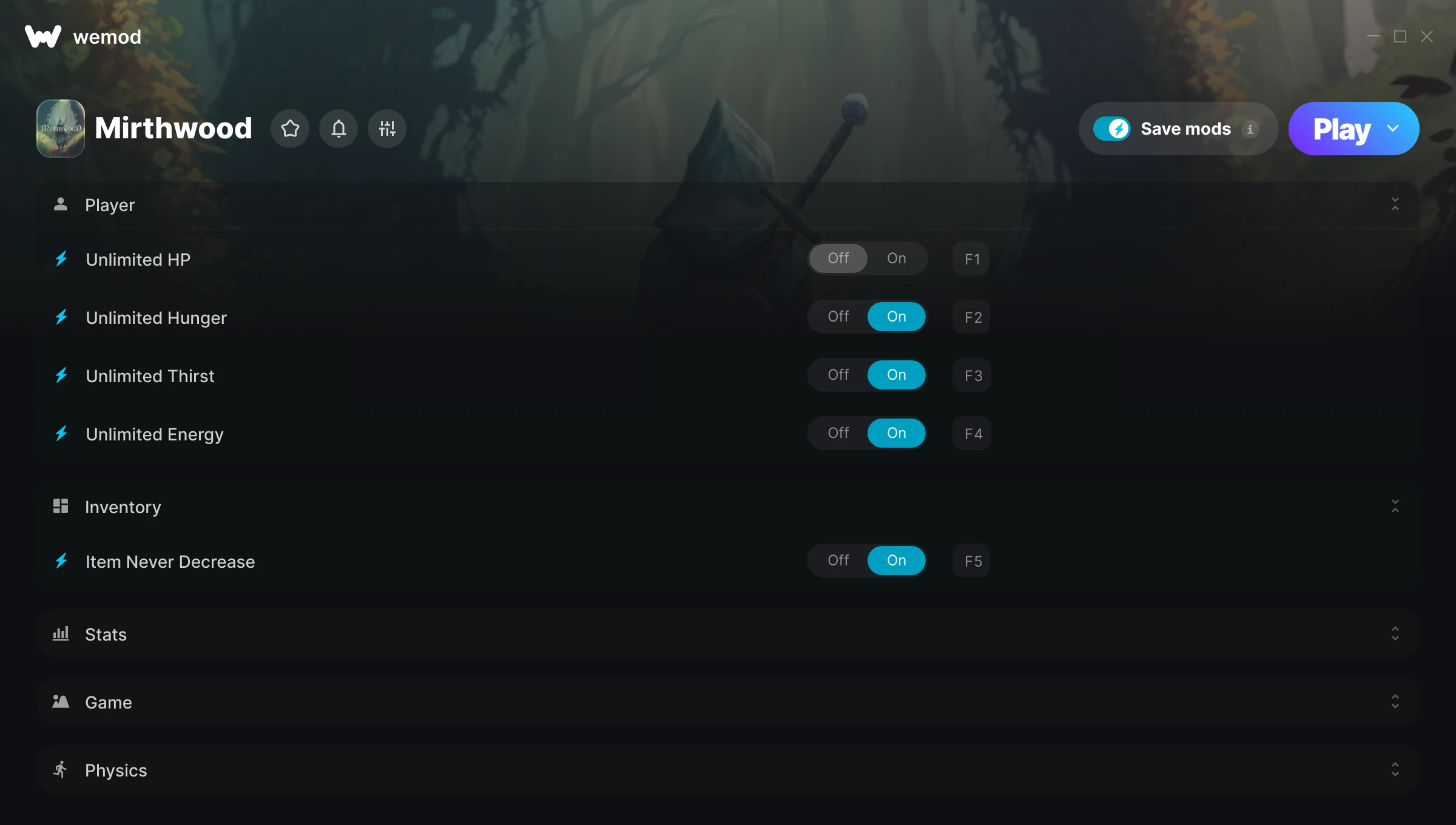
The Mirthwood Trainer gives you access to 14 cheats that let you play the game however you want. Struggling with a tough section? Want to skip the grind? Just want to mess around? This trainer has you covered.
The trainers below give you complete control over your experience. Use them however you want.
Released in 2024, this role-playing (rpg) and simulator title continues to pull in players who want to get more out of it.
Once you’ve got this trainer installed, it takes care of itself. Every time the game gets a patch, the trainer updates automatically so your cheats keep working.
Some of the most popular cheats included in this trainer are Unlimited HP, Unlimited Hunger, Unlimited Thirst, Unlimited Energy, and many more. These modifications let you customize difficulty, skip grinding, or simply experiment with the game in new ways.
Mirthwood Trainer Cheats
This trainer includes 14 cheats covering health, resources, movement, crafting, time.
| # | Cheat | Effect |
|---|---|---|
| 1 | Unlimited HP | Your hp never runs out or depletes |
| 2 | Unlimited Hunger | Your hunger never runs out or depletes |
| 3 | Unlimited Thirst | Your thirst never runs out or depletes |
| 4 | Unlimited Energy | Use your energy as much as you want without limits |
| 5 | Item Never Decrease | Tweak the item never decrease mechanic to your advantage |
| 6 | Unlimited Gold | Gold for days – never worry about currency again |
| 7 | Multiply Gold Get From Selling | Tweak the multiply gold get from selling mechanic to your advantage |
| 8 | Edit Gold | Dial in the exact gold you want |
| 9 | Edit Morality | Set your morality to any value you choose |
| 10 | Edit Renown | Fine-tune your renown to the perfect amount |
| 11 | Remove Crafting Materials Requirement | Tweak the remove crafting materials requirement mechanic to your advantage |
| 12 | ZA WARUDO! [Time Stop] | Tweak the za warudo! [time stop] mechanic to your advantage |
| 13 | Game Speed | Speed up or slow down the entire game to your liking |
| 14 | Multiply Run Speed | Tweak the multiply run speed mechanic to your advantage |
What Can You Do With This Trainer?
Here are some of the standout cheats in this trainer – the ones that really change how you play:
- Unlimited HP – Use your hp as much as you want without limits
- Unlimited Hunger – Remove all limits on your hunger
- Unlimited Thirst – Use your thirst as much as you want without limits
- Unlimited Energy – Your energy never runs out or depletes
- Item Never Decrease – Tweak the item never decrease mechanic to your advantage
And that’s just scratching the surface. The full Mirthwood cheat list above has everything you need to play completely on your own terms.
Recommended Cheat Presets
Not sure which cheats to enable? Here are some recommended preset combinations for different playstyles:
Farming Preset
Skip the grind entirely. Max out your loot, XP, and cash without spending hours farming the same enemies over and over.
- Unlimited Gold
- Multiply Gold Get From Selling
- Edit Gold
Download Mirthwood Trainer
Download the latest version of this trainer for PC below.
| Version | Creator | Platform | Date Added | Download |
|---|---|---|---|---|
| Auto-Updating Version (Latest) | ColonelRVH | Steam | 2026-01-21 | Download |
How to Use This Trainer
- Launch the Game – Open Mirthwood and get to the point where you’re actually playing. The trainer hooks into the game while it’s running.
- Activate WeMod – Run the WeMod app, locate “Mirthwood”, and hit Play. WeMod attaches to the game and shows you the full cheat list in the overlay.
- Select and Activate – Choose your cheats from the WeMod overlay and flip them on. Every toggle takes effect right away with no need to reload.
- Play Your Way – That’s the full setup. Get back into Mirthwood and play on your own terms. Adjust cheats whenever the mood strikes.
Tips & Known Issues
- Trainers are designed for single-player use only. Using them online or in multiplayer will result in a ban.
- Make a copy of your save data before experimenting with cheats. Better safe than sorry.
- Antivirus software may detect the trainer as suspicious. This is normal for game trainers – add an exclusion to proceed.
- Running the trainer as Admin avoids most permission-related issues. Right-click and choose Run as Administrator.
- One of the perks of WeMod is automatic updates. The trainer syncs with game patches behind the scenes.
Frequently Asked Questions
How often is this trainer updated?
This trainer auto-updates shortly after each game patch, so it stays compatible without you having to do anything.
What should I do if the trainer stops working after an update?
If a game patch breaks things, the auto-updating trainer will fix itself automatically – usually within a day or two.
Is this trainer free to download?
Free as it gets. The download links are right above this section, pick whichever version suits you.
Do I need to restart the game after activating cheats?
No restart needed. Cheats take effect the moment you activate them – toggle freely while you play.
Does this trainer work with Steam?
Yes, it works with the Steam version of the game.