
Norland Trainer
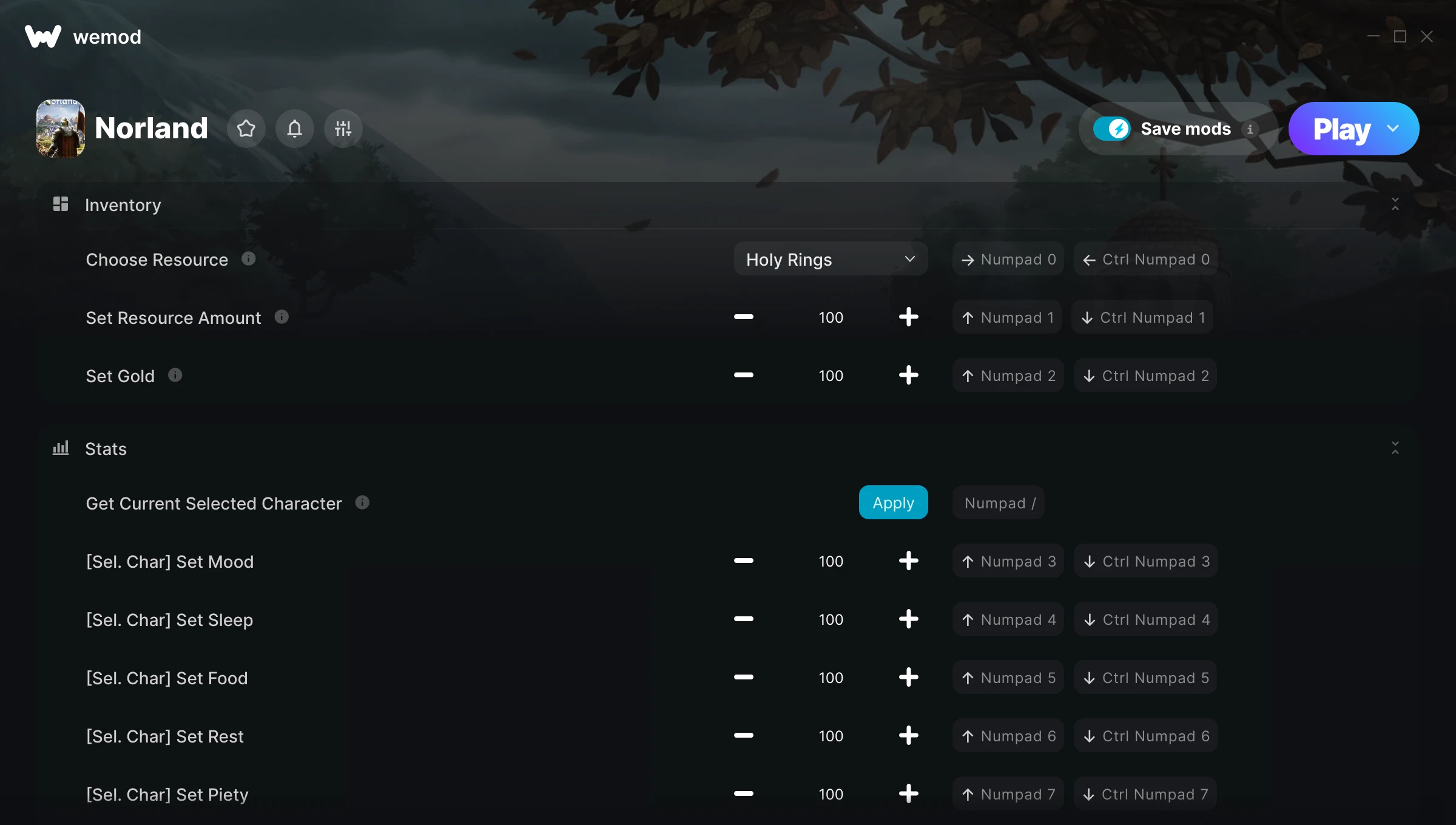
The Norland Trainer gives you access to 15 cheats that let you play the game however you want. Struggling with a tough section? Want to skip the grind? Just want to mess around? This trainer has you covered.
Think of it as unlocking developer mode. Except better.
This role-playing (rpg) and simulator title has been around since 2024 and remains a popular pick for players looking to push their experience further.
There’s an Auto-Updating Version that syncs with game patches on its own, and a Standalone version for anyone who prefers a one-time download. Either way, every cheat in the list is included.
Some of the most popular cheats included in this trainer are Choose Resource, Set Resource Amount, Set Gold, Get Current Selected Character, and many more. These modifications let you customize difficulty, skip grinding, or simply experiment with the game in new ways.
Norland Trainer Cheats
This trainer includes 15 cheats covering resources, time.
| # | Cheat | Effect |
|---|---|---|
| 1 | Choose Resource | Tweak the choose resource mechanic to your advantage |
| 2 | Set Resource Amount | Adjust resource amount to whatever feels right |
| 3 | Set Gold | Manually set your gold to any number |
| 4 | Get Current Selected Character | Tweak the get current selected character mechanic to your advantage |
| 5 | [Sel. Char] Set Mood | Adjust [sel. char] mood to whatever feels right |
| 6 | [Sel. Char] Set Sleep | Adjust [sel. char] sleep to whatever feels right |
| 7 | [Sel. Char] Set Food | Pick your own value for [sel. char] food |
| 8 | [Sel. Char] Set Rest | Pick your own value for [sel. char] rest |
| 9 | [Sel. Char] Set Piety | Pick your own value for [sel. char] piety |
| 10 | [Sel. Char] Set Sex | Pick your own value for [sel. char] sex |
| 11 | [Sel. Char] Increase Age | Tweak the [sel. char] increase age mechanic to your advantage |
| 12 | [Sel. Char] Decrease Age | Tweak the [sel. char] decrease age mechanic to your advantage |
| 13 | [Sel. Char] Add Massively Positive Thought | Add extra [sel. char] massively positive thought whenever you need it |
| 14 | [Sel. Char] Remove Time Thoughts | Tweak the [sel. char] remove time thoughts mechanic to your advantage |
| 15 | [Sel. Char] Set All Skills to Talent | Adjust [sel. char] all skills to talent to whatever feels right |
What Can You Do With This Trainer?
Here are some of the standout cheats in this trainer – the ones that really change how you play:
- Choose Resource – Tweak the choose resource mechanic to your advantage
- Set Resource Amount – Manually set your resource amount to any number
- Set Gold – Adjust gold to whatever feels right
- Get Current Selected Character – Tweak the get current selected character mechanic to your advantage
- [Sel. Char] Set Mood – Choose exactly how much [sel. char] mood you want
And that’s just scratching the surface. The full cheat list above has everything you need to play the game completely on your own terms.
Download Norland Trainer
Download the latest version of this trainer for PC below.
| Version | Creator | Platform | Date Added | Download |
|---|---|---|---|---|
| Auto-Updating Version (Latest) | GreenHouse | Steam | 2025-11-10 | Download |
| Standalone Version | FLiNG | Steam | 2025-09-19 | Download |
How to Use This Trainer
- Run Norland – Get the game running first – load a save or start fresh. The trainer won’t work unless the game is already open.
- Run Your Chosen Trainer – For the auto-updating version, open WeMod and find “Norland”. For the standalone version, run the FLiNG .exe file as Administrator. Both connect to the game automatically.
- Activate Cheats – Toggle the cheats you want using the WeMod overlay or press the assigned hotkeys. Cheats activate in real-time while you play.
- Play and Enjoy – That’s it – jump back into the game and enjoy. You can toggle cheats on and off whenever you want. Half the fun is experimenting to find your perfect setup.
Tips & Known Issues
- Keep this trainer offline. Single-player only – any online or multiplayer use risks a permanent ban from the game.
- Some antivirus software may flag the trainer as a false positive. You may need to add an exception for it.
- Make a copy of your save data before experimenting with cheats. Better safe than sorry.
- Having issues on Steam? Try disabling the Steam Overlay under Settings > In-Game. It can sometimes clash with trainers.
- One of the perks of WeMod is automatic updates. The trainer syncs with game patches behind the scenes.
Frequently Asked Questions
Can I use multiple cheats at the same time?
You can run every single cheat at once if you want. Mix and match until you find a combination you enjoy.
How do I know which version to download?
The Auto-Updating Version is the easiest choice – it handles compatibility on its own. Pick the Standalone if you want a specific build that won’t change.
What should I do if the trainer stops working after an update?
Sit tight. The auto-updating trainer usually fixes itself within a day or so after a patch. If you’re on the Standalone version, look for a newer build.
Do I need to restart the game after activating cheats?
No. Cheats are live the instant you toggle them. You can switch them on and off mid-gameplay without interruption.
Does this trainer work with Steam?
Fully compatible with Steam. Just launch the game through Steam and run the trainer alongside it.



