Project Wunderwaffe Trainer
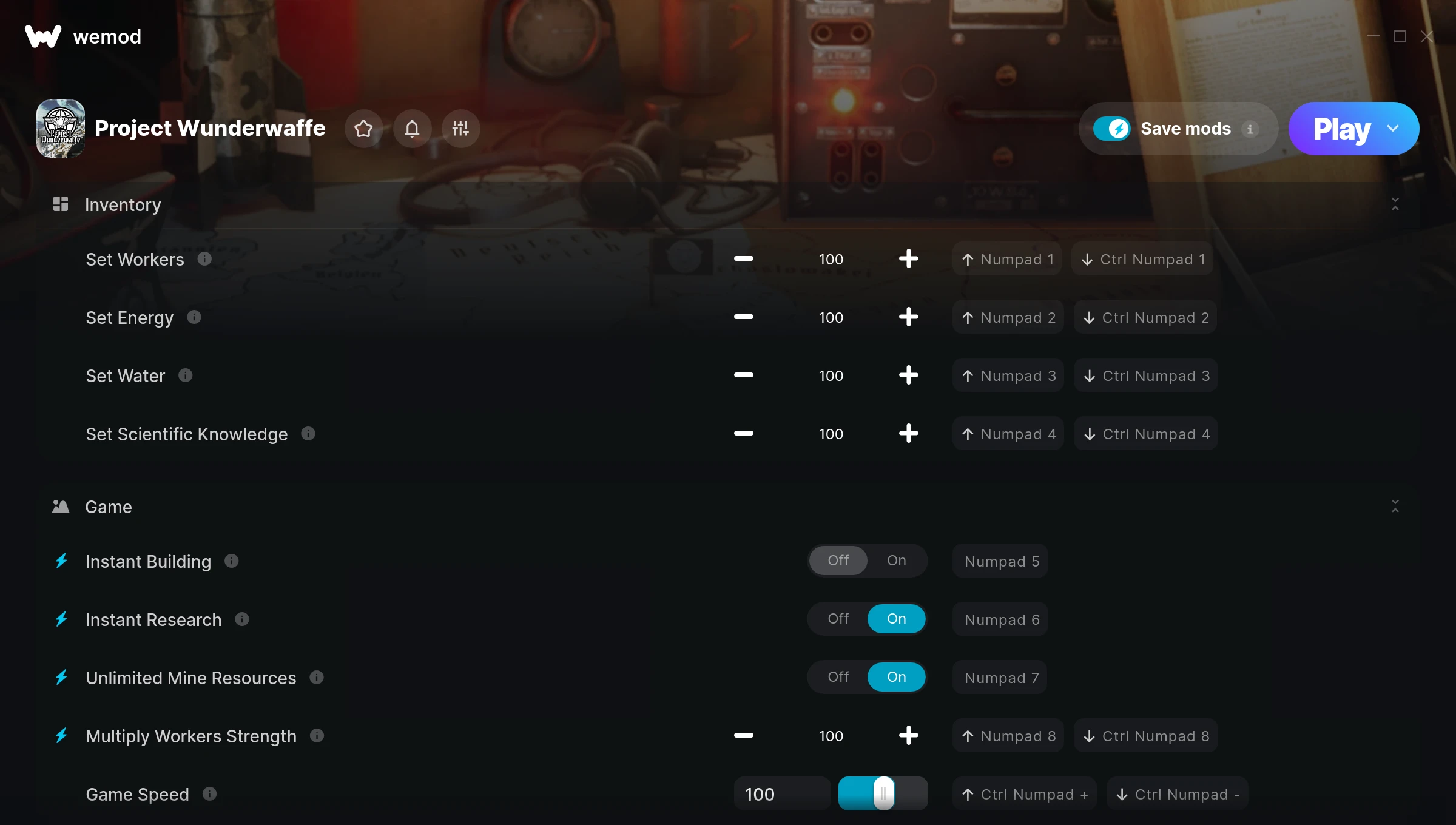
The Project Wunderwaffe Trainer gives you access to 9 cheats that let you play the game however you want. Struggling with a tough section? Want to skip the grind? Just want to mess around? This trainer has you covered.
Perfect for a second playthrough where you just want to mess around and have fun.
Released in 2022, this simulator and strategy title continues to pull in players who want to get more out of it.
The best part? This PC trainer auto-updates whenever the game is patched. Zero effort on your part – it stays compatible in the background so you can just play.
Some of the most popular cheats included in this trainer are Set Workers, Set Energy, Set Water, Set Scientific Knowledge, and many more. These modifications let you customize difficulty, skip grinding, or simply experiment with the game in new ways.
Project Wunderwaffe Trainer Cheats
This trainer includes 9 cheats covering resources, movement, crafting, time.
| # | Cheat | Effect |
|---|---|---|
| 1 | Set Workers | Manually set your workers to any number |
| 2 | Set Energy | Pick your own value for energy |
| 3 | Set Water | Pick your own value for water |
| 4 | Set Scientific Knowledge | Manually set your scientific knowledge to any number |
| 5 | Instant Building | Skip the wait and trigger building right away |
| 6 | Instant Research | Skip the wait and trigger research right away |
| 7 | Unlimited Mine Resources | Use your mine resources as much as you want without limits |
| 8 | Multiply Workers Strength | Tweak the multiply workers strength mechanic to your advantage |
| 9 | Game Speed | Speed up or slow down the entire game to your liking |
What Can You Do With This Trainer?
Here are some of the standout cheats in this trainer – the ones that really change how you play:
- Set Workers – Adjust workers to whatever feels right
- Set Energy – Manually set your energy to any number
- Set Water – Adjust water to whatever feels right
- Set Scientific Knowledge – Pick your own value for scientific knowledge
- Instant Building – Get building immediately with no waiting
And that’s just scratching the surface. The full Project Wunderwaffe cheat list above has everything you need to play completely on your own terms.
Download Project Wunderwaffe Trainer
Download the latest version of this trainer for PC below.
| Version | Creator | Platform | Date Added | Download |
|---|---|---|---|---|
| Auto-Updating Version (Latest) | GreenHouse | Steam | 2026-01-09 | Download |
How to Use This Trainer
- Open Project Wunderwaffe – Launch the game and wait until you’re in-game or at the main menu. The trainer needs the game process running to hook into it.
- Launch WeMod – Fire up the WeMod app and search for “Project Wunderwaffe”. Hit Play and the overlay will appear over your game with all cheats ready to toggle.
- Toggle Your Cheats – Flip on whichever cheats you want from the WeMod overlay. Each one takes effect immediately – no restart needed.
- Jump Back In – You’re good to go. Return to the game and enjoy your modified experience. Toggle cheats on or off anytime as you play.
Tips & Known Issues
- Never activate this trainer during online play. It’s built for single-player only and multiplayer anti-cheat will catch it.
- Don’t be alarmed if Windows Defender or your antivirus flags the download. Trainers are routinely flagged as false positives.
- If cheats toggle on but have no effect, your game version might be out of date. Update the game and try again.
- Launch the trainer with elevated permissions (Run as Administrator) to avoid access issues.
- One of the perks of WeMod is automatic updates. The trainer syncs with game patches behind the scenes.
Frequently Asked Questions
Can I get banned for using this trainer?
Not in single-player – that’s what trainers are designed for. Never use them in online or multiplayer though, that will get you banned.
Will this trainer affect my save files?
Your save files are safe. Cheats only change values in RAM while you play. Just be aware that anything you accomplish with cheats active gets saved like normal progress.
Can I use multiple cheats at the same time?
You can run every single cheat at once if you want. Mix and match until you find a combination you enjoy.
Is this trainer compatible with mods?
Generally, yes. Most mods and trainers operate independently. You might see odd behaviour if a mod directly changes the same stats the trainer controls.
Do I need to restart the game after activating cheats?
Nope. Cheats kick in immediately while the game is running. Just toggle them on and off whenever you want.
Does this trainer work with Steam?
Yes. The trainer hooks into the game process when launched through Steam.