The Guild 3 Trainer
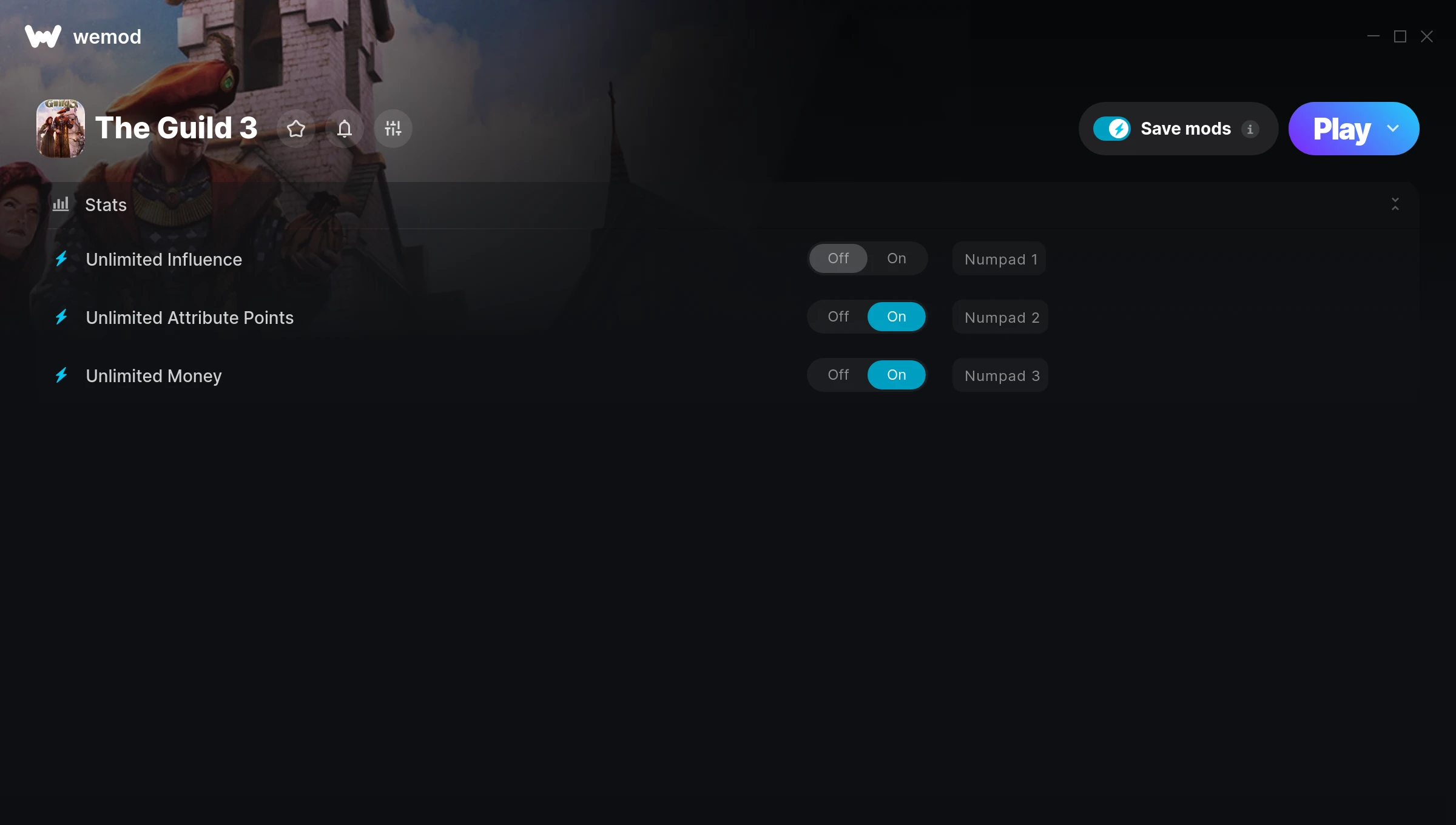
The The Guild 3 Trainer gives you access to 3 cheats that let you play the game however you want. Struggling with a tough section? Want to skip the grind? Just want to mess around? This trainer has you covered.
Unlimited money removes the grind entirely – just buy what you want and get back to the fun parts. These cheats let you get past the frustrating parts and actually enjoy the game at your own pace.
There’s a reason trainers have been around since the DOS era. They just make games more fun.
This role-playing (rpg) and simulator title has been around since 2017 and remains a popular pick for players looking to push their experience further.
Once you’ve got this trainer installed, it takes care of itself. Every time the game gets a patch, the trainer updates automatically so your cheats keep working.
The Guild 3 Trainer Cheats
This trainer includes 3 cheats covering resources.
| # | Cheat | Effect |
|---|---|---|
| 1 | Unlimited Influence | Remove all limits on your influence |
| 2 | Unlimited Attribute Points | Remove all limits on your attribute points |
| 3 | Unlimited Money | Buy anything you want without thinking about cost |
What Can You Do With This Trainer?
Here are some of the standout cheats in this trainer – the ones that really change how you play:
- Unlimited Influence – Remove all limits on your influence
- Unlimited Attribute Points – Your attribute points never runs out or depletes
- Unlimited Money – Buy anything you want without thinking about cost
And that’s just scratching the surface. The full The Guild 3 cheat list above has everything you need to play completely on your own terms.
Download The Guild 3 Trainer
Download the latest version of this trainer for PC below.
| Version | Creator | Platform | Date Added | Download |
|---|---|---|---|---|
| Auto-Updating Version (Latest) | STiNGERR | Steam | 2026-01-30 | Download |
How to Use This Trainer
- Get Into The Guild 3 – Launch the game, get past the splash screens, and load into gameplay. Once you can see your character or the main menu, move to step 2.
- Open the Trainer – Open the WeMod app and search for “The Guild 3”. Click Play to launch the overlay. WeMod will detect the game and enable all available cheats.
- Enable the Cheats You Want – Use the WeMod overlay to enable any combination of cheats. Everything activates in real-time while the game is running.
- Play Your Way – That’s the full setup. Get back into The Guild 3 and play on your own terms. Adjust cheats whenever the mood strikes.
Tips & Known Issues
- Keep this trainer offline. Single-player only – any online or multiplayer use risks a permanent ban from the game.
- Make a copy of your save data before experimenting with cheats. Better safe than sorry.
- Not on PC? Unfortunately, trainers don’t work on console or cloud gaming platforms – they require direct memory access.
- Trainers modify game memory, which can trigger antivirus warnings. These are false positives – add an exception if needed.
- One of the perks of WeMod is automatic updates. The trainer syncs with game patches behind the scenes.
Frequently Asked Questions
How often is this trainer updated?
This trainer auto-updates shortly after each game patch, so it stays compatible without you having to do anything.
Can I use multiple cheats at the same time?
Absolutely. Stack as many as you want. God mode plus unlimited ammo plus one-hit kills? Go for it. That’s half the fun.
What cheats are included in this trainer?
The trainer comes loaded with 3 cheats. Everything from combat tweaks to resource mods – the full list is in the table above.
How do I use this trainer?
Just download the trainer and open it while the game is running. Each cheat has a toggle – flip them on or off as you play.
Is this trainer free to download?
100% free. Hit one of the download buttons above and you can be up and running in seconds.
Is this trainer compatible with mods?
They’re typically fine together. The rare exception is when a mod overwrites the same values the trainer hooks into, but that’s uncommon.
Does this trainer work with Steam?
It does. This trainer is built to work with the Steam version.