
This War of Mine Trainer
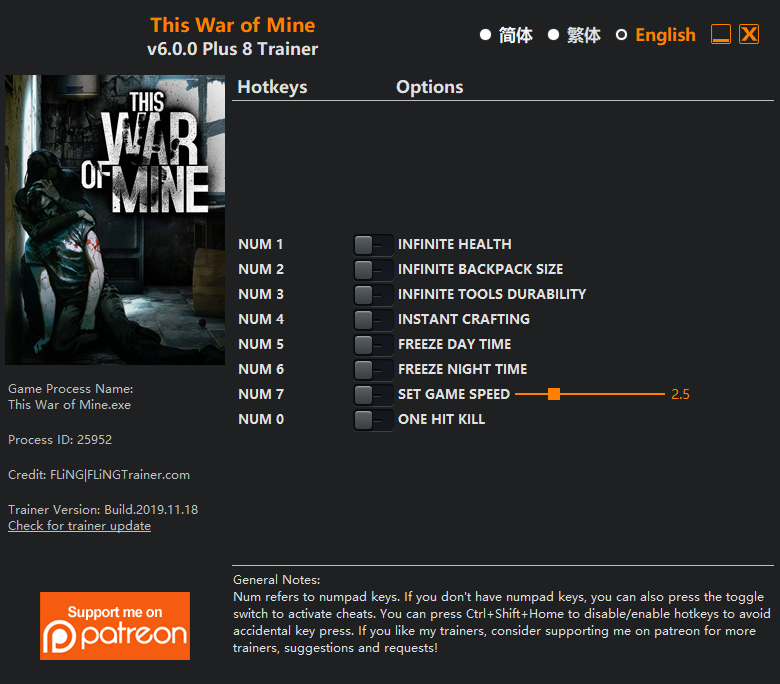
The This War of Mine Trainer gives you access to 8 cheats that let you play the game however you want. Struggling with a tough section? Want to skip the grind? Just want to mess around? This trainer has you covered.
Perfect for a second playthrough where you just want to mess around and have fun.
Out since 2014, this simulator and strategy title is still going strong with players who want to shape the experience on their own terms.
You get two download options here. The Auto-Updating Version stays current automatically whenever the game is patched – zero effort on your part. Or grab the Standalone version if you want a specific build that won’t change.
Some of the most popular cheats included in this trainer are Unlimited Health, Max Backpack Size, Freeze Day Time, Unlimited Tools Durability, and many more. These modifications let you customize difficulty, skip grinding, or simply experiment with the game in new ways.
This War of Mine Trainer Cheats
This trainer includes 8 cheats covering health, movement, crafting, cooldowns, time.
| # | Cheat | Effect |
|---|---|---|
| 1 | Unlimited Health | Your health stays maxed out no matter what hits you |
| 2 | Max Backpack Size | Instantly push your backpack size to the highest value |
| 3 | Unlimited Tools Durability | Your tools durability never runs out or depletes |
| 4 | Instant Crafting | Get crafting immediately with no waiting |
| 5 | One-Hit Kills | Tweak the one hit kills mechanic to your advantage |
| 6 | Freeze Day Time | Prevent your day time from going up or down |
| 7 | Freeze Night Time | Lock your night time so it never changes |
| 8 | Set Game Speed | Speed up or slow down the entire game to your liking |
What Can You Do With This Trainer?
Here are some of the standout cheats in this trainer – the ones that really change how you play:
- Unlimited Health – Your health stays maxed out no matter what hits you
- Max Backpack Size – Set your backpack size to the absolute maximum
- Unlimited Tools Durability – Use your tools durability as much as you want without limits
- Instant Crafting – Skip the wait and trigger crafting right away
- One-Hit Kills – Tweak the one hit kills mechanic to your advantage
And that’s just scratching the surface. The full cheat list above has everything you need to play the game completely on your own terms.
Download This War of Mine Trainer
Download the latest version of this trainer for PC below.
| Version | Creator | Platform | Date Added | Download |
|---|---|---|---|---|
| Auto-Updating Version (Latest) | FLiNG | Steam, Xbox | 2025-07-13 | Download |
| Standalone Version | FLiNG | Steam | 2025-05-24 | Download |
How to Use This Trainer
- Boot Up This War of Mine – Start the game like you normally would. Once you’re at the main menu or loaded into your save, you’re ready for the next step.
- Open the Trainer – If using WeMod, open the app and search for “This War of Mine”. Click Play to launch the overlay. For the standalone FLiNG trainer, run the downloaded .exe as Administrator.
- Flip On the Cheats – In the WeMod overlay, toggle the cheats you’re interested in. They apply immediately to your game session.
- Have Fun – Done! Get back to playing and enjoy the ride. Mix and match cheats whenever you want – there’s no wrong way to use them.
Tips & Known Issues
- Never activate this trainer during online play. It’s built for single-player only and multiplayer anti-cheat will catch it.
- Make a copy of your save data before experimenting with cheats. Better safe than sorry.
- Trainers modify game memory, which can trigger antivirus warnings. These are false positives – add an exception if needed.
- If the trainer isn’t working, make sure your game is fully updated to the latest version.
- Using WeMod? The trainer stays current on its own – it auto-patches after every game update.
Frequently Asked Questions
Will the trainer work with the latest game version?
The auto-updating trainer stays compatible with new patches on its own. If you grabbed the Standalone version, you might need to check for a newer release after big updates.
What cheats are included in this trainer?
There are 8 cheats in total – check the cheat table further up the page for the complete breakdown.
Is this trainer free to download?
It is. No hidden fees, no sign-up walls – just download it from the links above and start playing.
How do I know which version to download?
The Auto-Updating Version is the easiest choice – it handles compatibility on its own. Pick the Standalone if you want a specific build that won’t change.
Does this trainer work with Steam?
It does. The trainer is compatible with Steam, Xbox.



