Warhammer Age of Sigmar: Realms of Ruin Trainer
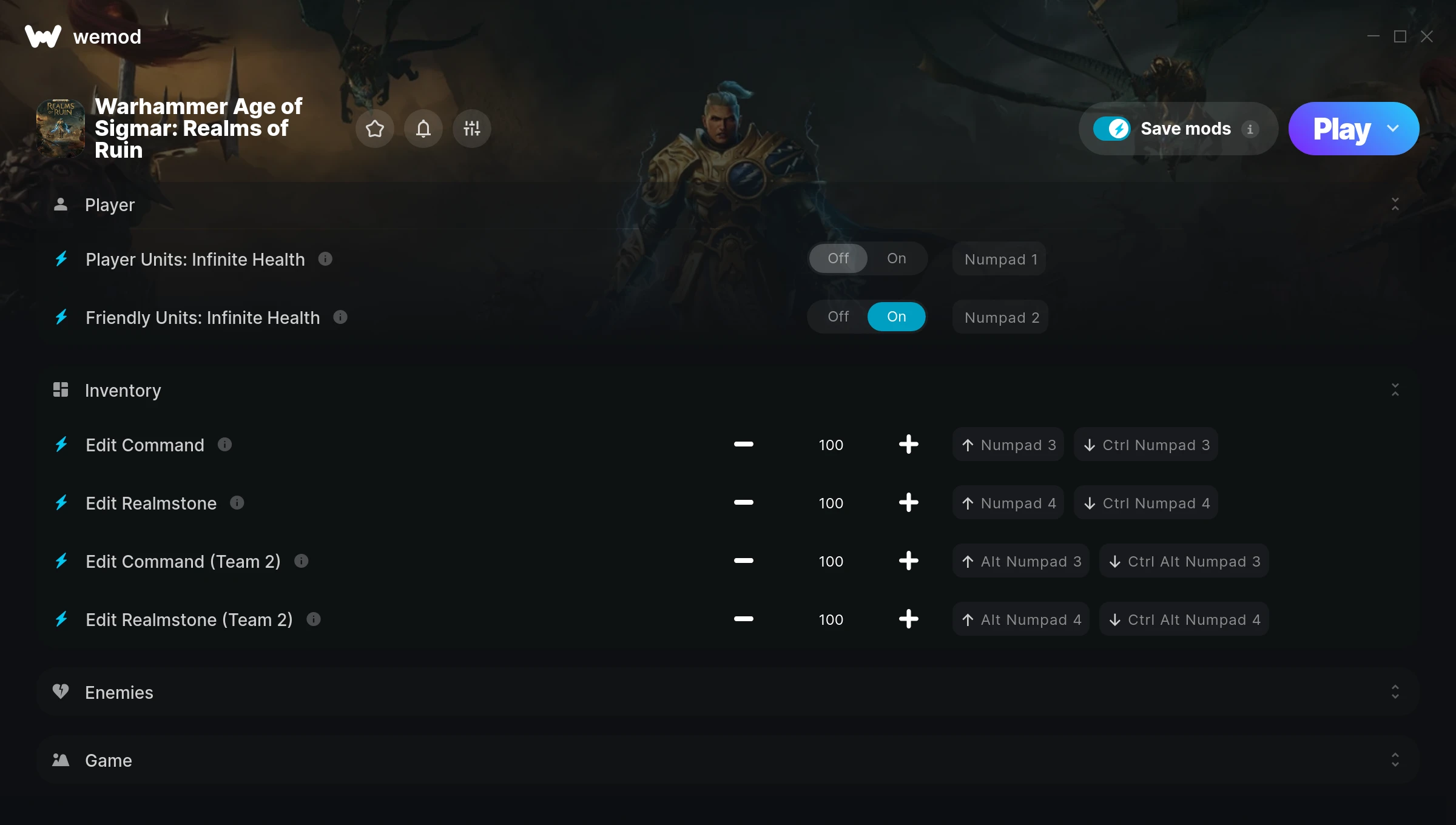
The Warhammer Age of Sigmar: Realms of Ruin Trainer gives you access to 8 cheats that let you play the game however you want. Struggling with a tough section? Want to skip the grind? Just want to mess around? This trainer has you covered.
Infinite health means you can charge headfirst into anything without consequences. It’s as liberating as it sounds. These cheats let you get past the frustrating parts and actually enjoy the game at your own pace.
Perfect for a second playthrough where you just want to mess around and have fun.
This one goes back to 2023. As far as real time strategy (rts) and simulator titles go, Warhammer Age of Sigmar: Realms of Ruin holds up and the community is still active.
Once you’ve got this trainer installed, it takes care of itself. Every time the game gets a patch, the trainer updates automatically so your cheats keep working.
Some of the most popular cheats included in this trainer are Player Units: Infinite Health, Friendly Units: Infinite Health, Edit Command, Edit Realmstone, and many more. These modifications let you customize difficulty, skip grinding, or simply experiment with the game in new ways.
Warhammer Age of Sigmar: Realms of Ruin Trainer Cheats
This trainer includes 8 cheats covering health, combat, movement, time.
| # | Cheat | Effect |
|---|---|---|
| 1 | Player Units: Infinite Health | Health that never drops – charge into anything without worry |
| 2 | Friendly Units: Infinite Health | Adjust your friendly units: health however you see fit |
| 3 | Edit Command | Set your command to any value you choose |
| 4 | Edit Realmstone | Fine-tune your realmstone to the perfect amount |
| 5 | Edit Command (Team 2) | Dial in the exact command (team 2) you want |
| 6 | Edit Realmstone (Team 2) | Fine-tune your realmstone (team 2) to the perfect amount |
| 7 | Easy Kills | Enemies go down way faster than they normally would |
| 8 | Set Game Speed | Speed up or slow down the entire game to your liking |
What Can You Do With This Trainer?
Here are some of the standout cheats in this trainer – the ones that really change how you play:
- Player Units: Infinite Health – Health that never drops – charge into anything without worry
- Friendly Units: Infinite Health – Never worry about running out of friendly units: health again
- Edit Command – Set your command to any value you choose
- Edit Realmstone – Dial in the exact realmstone you want
- Edit Command (Team 2) – Dial in the exact command (team 2) you want
And that’s just scratching the surface. The full Warhammer Age of Sigmar: Realms of Ruin cheat list above has everything you need to play completely on your own terms.
Recommended Cheat Presets
Not sure which cheats to enable? Here are some recommended preset combinations for different playstyles:
Easy Mode
Turn the difficulty down to nothing. Perfect for enjoying the story, or for a second playthrough where you just want to feel unstoppable.
- Player Units: Infinite Health
- Friendly Units: Infinite Health
- Easy Kills
Download Warhammer Age of Sigmar: Realms of Ruin Trainer
Download the latest version of this trainer for PC below.
| Version | Creator | Platform | Date Added | Download |
|---|---|---|---|---|
| Auto-Updating Version (Latest) | FLiNG | Steam | 2025-07-13 | Download |
How to Use This Trainer
- Get Into Warhammer Age of Sigmar: Realms of Ruin – Launch the game, get past the splash screens, and load into gameplay. Once you can see your character or the main menu, move to step 2.
- Open WeMod Overlay – Search for “Warhammer Age of Sigmar: Realms of Ruin” in WeMod and click Play. The in-game overlay will appear with toggles for every available cheat.
- Turn On Cheats – Pick the cheats you want from the WeMod overlay and switch them on. They kick in instantly and you can toggle them off anytime.
- Jump Back In – You’re good to go. Return to the game and enjoy your modified experience. Toggle cheats on or off anytime as you play.
Tips & Known Issues
- This is a single-player trainer only. Do not use it in online or multiplayer modes – you will get banned.
- If you’re running other overlays (Discord, NVIDIA, MSI Afterburner), try disabling them if the trainer isn’t responding.
- Your antivirus might quarantine the trainer file. This is a known false positive – whitelist the trainer in your security software.
- Make a copy of your save data before experimenting with cheats. Better safe than sorry.
- One of the perks of WeMod is automatic updates. The trainer syncs with game patches behind the scenes.
Frequently Asked Questions
Will the trainer work with the latest game version?
The auto-updating trainer stays compatible with new patches on its own. If you grabbed the Standalone version, you might need to check for a newer release after big updates.
How often is this trainer updated?
This trainer auto-updates shortly after each game patch, so it stays compatible without you having to do anything.
Do I need to restart the game after activating cheats?
Nope. Cheats kick in immediately while the game is running. Just toggle them on and off whenever you want.
Is this trainer compatible with mods?
Generally, yes. Most mods and trainers operate independently. You might see odd behaviour if a mod directly changes the same stats the trainer controls.
Can I use multiple cheats at the same time?
Of course. There’s no limit to how many you can have active. Layer them however you want.
How do I use this trainer?
Just download the trainer and open it while the game is running. Each cheat has a toggle – flip them on or off as you play.
Does this trainer work with Steam?
Yes, it works with the Steam version of the game.