
World War Z: Aftermath Trainer
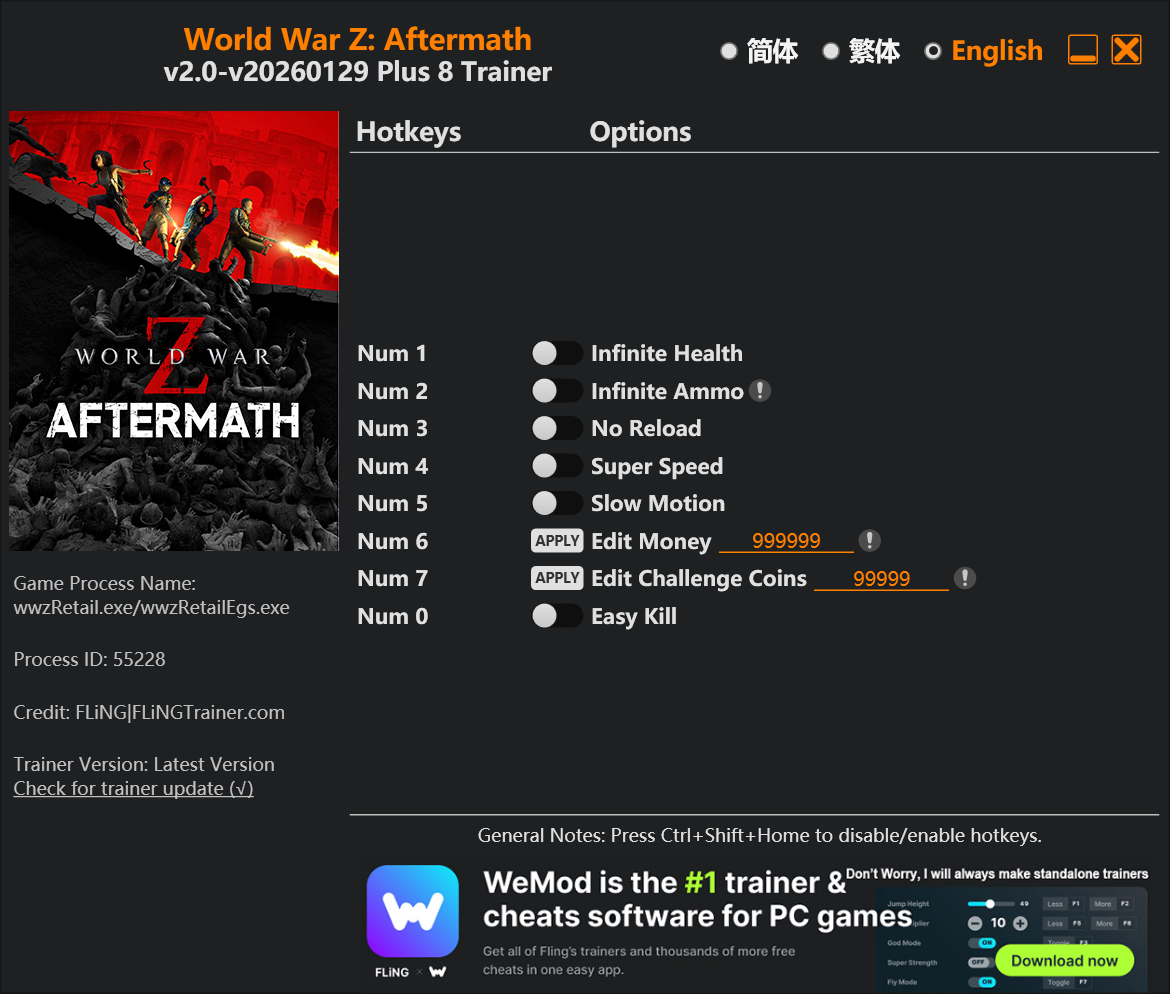
The World War Z: Aftermath Trainer gives you access to 6 cheats that let you play the game however you want. Struggling with a tough section? Want to skip the grind? Just want to mess around? This trainer has you covered.
This trainer supports both the original World War Z and the Aftermath expansion, so you’re covered whether you’re playing the base game or the expanded DLC content.
Infinite health means you can charge headfirst into anything without consequences. It’s as liberating as it sounds. These cheats let you get past the frustrating parts and actually enjoy the game at your own pace.
Once you try god mode in this game, it’s hard to go back. Just saying.
Originally a 2021 release, World War Z: Aftermath carved out a solid spot in the shooter and adventure space and players keep coming back.
Some of the most popular cheats included in this trainer are Num 1 – Infinite Health, Num 2 – Infinite Ammo, Num 3 – No Reload, Num 4 – Super Speed, and many more. These modifications let you customize difficulty, skip grinding, or simply experiment with the game in new ways.
World War Z: Aftermath Trainer Cheats
This trainer includes 6 cheats covering health, ammo, resources, movement.
| # | Cheat | Effect |
|---|---|---|
| 1 | Num 1 – Infinite Health | Health that never drops – charge into anything without worry |
| 2 | Num 2 – Infinite Ammo | Your ammo count never drops no matter how much you shoot |
| 3 | Num 3 – No Reload | Skip reload animations entirely and keep firing nonstop |
| 4 | Num 4 – Super Speed | Move through the game world at blazing speed |
| 5 | Num 6 – Edit Money | Dial in the exact money you want |
| 6 | Num 7 – Edit Challenge Coins | Fine-tune your challenge coins to the perfect amount |
What Can You Do With This Trainer?
Here are some of the standout cheats in this trainer – the ones that really change how you play:
- Num 1 – Infinite Health – Health that never drops – charge into anything without worry
- Num 2 – Infinite Ammo – Your ammo count never drops no matter how much you shoot
- Num 3 – No Reload – Skip reload animations entirely and keep firing nonstop
- Num 4 – Super Speed – Move through the game world at blazing speed
- Num 6 – Edit Money – Set your money to any value you choose
And that’s just scratching the surface. The full cheat list above has everything you need to play the game completely on your own terms.
Recommended Cheat Presets
Not sure which cheats to enable? Here are some recommended preset combinations for different playstyles:
Easy Mode
Turn the difficulty down to nothing. Perfect for enjoying the story, or for a second playthrough where you just want to feel unstoppable.
- Num 1 – Infinite Health
- Num 2 – Infinite Ammo
- Num 3 – No Reload
Farming Preset
Skip the grind entirely. Max out your loot, XP, and cash without spending hours farming the same enemies over and over.
- Num 6 – Edit Money
- Num 7 – Edit Challenge Coins
Download World War Z: Aftermath Trainer
Download the latest version of this trainer for PC below.
| Version | Creator | Platform | Date Added | Download |
|---|---|---|---|---|
| Standalone Version | FLiNG | PC (Windows) | 2026-02-03 | Download |
How to Use This Trainer
- Run World War Z: Aftermath – Get the game running first – load a save or start fresh. The trainer won’t work unless the game is already open.
- Execute the Trainer – Open the FLiNG standalone trainer as Administrator. You’ll see a window listing every cheat alongside its keyboard shortcut.
- Activate via Keyboard – The trainer window shows a hotkey next to each cheat. Press the listed key to turn a cheat on, and press it again to disable it.
- Dive In – Everything is ready. Return to World War Z: Aftermath and enjoy the game your way. Swap cheats around whenever you feel like mixing things up.
Tips & Known Issues
- This is a single-player trainer only. Do not use it in online or multiplayer modes – you will get banned.
- If this is your primary save, consider making a backup first. Cheats won’t corrupt data, but it’s good to have a safety net.
- Running the trainer as Admin avoids most permission-related issues. Right-click and choose Run as Administrator.
- Overlay apps from Discord, NVIDIA, or Razer can occasionally clash with trainer hooks. Disable them as a troubleshooting step.
Frequently Asked Questions
How do I know which version to download?
The Auto-Updating Version is the easiest choice – it handles compatibility on its own. Pick the Standalone if you want a specific build that won’t change.
How often is this trainer updated?
The Auto-Updating Version syncs with game patches within a day or two. Standalone releases come out as needed.
Can I get banned for using this trainer?
Not in single-player – that’s what trainers are designed for. Never use them in online or multiplayer though, that will get you banned.
Can I customise how much health or money I get?
Yes – many cheats have edit or set options that let you type in the exact value you want. Perfect for dialling things in without going completely overboard.



